
Using Lightbox2 in blogger / blogspot
If you have tried to click on the photo(s) in my blog post, you will find out that they have the behavior like:
- Will be pop up .
- Background turned dark color.
- The photos will then be emphasized in clear contrast for better viewing.
- There have the nagivation for next/previous photo, with closed button.
- The photos will resized corresponding with its own actual size, etc etc.
All of these features appeared is because I have installed the plugin Lightbox2 in wordpress.
I personally feel it is amazing, and would like to share how it work with Blogger / Blogspot.
First, Edit the template
Add these code before the header < /head > tag.
<link href=’http://www.marccus.net/lightbox2/css/lightbox.css’ media=’screen’ rel=’stylesheet’ type=’text/css’/>
<script src=’http://www.marccus.net/lightbox2/js/prototype.js’ type=’text/javascript’/>
<script src=’http://www.marccus.net/lightbox2/js/scriptaculous.js?load=effects,builder’ type=’text/javascript’/>
<script src=’http://www.marccus.net/lightbox2/js/lightbox.js’ type=’text/javascript’/>

Second, Upload the images and add “rel” attribute.
Now, when you have uploaded the photos while updating blog post, go to the Edit HTML mode and add rel=”lightbox” inside your < a href = “…. > hyperlink code. Each photo yea~~~
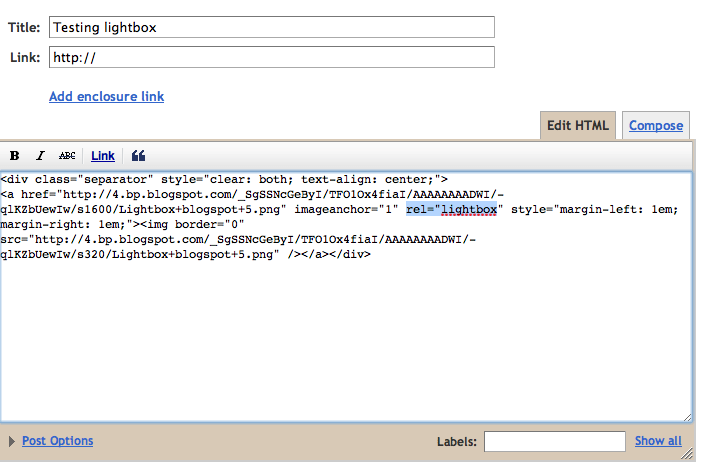
And if you have more than one picture, you need add a group name rel=”lightbox[group1]”.
So your code will be looks like this

Last, then, done, Publish your blog post.
Once done, you may publish your blog and test your photos. =)


Trying to do that but encounter this error when try to add code to tem[plate ;p
“Your template could not be parsed as it is not well-formed. Please make sure all XML elements are closed properly.
XML error message: Open quote is expected for attribute “{1}” associated with an element type “href”.”
I got that too, I just switched out all the ( ‘ ) with ( ” ).. Seems confusing? Yeah just copy and paste this:
hehe, how is the code looks like after you paste it in?