Lately there have a new trend to earn some pocket money using tweeter. It is, another blue bird, but is from Malaysia, the Churp Churp (www.churpchurp.com)! =D

How it really work? I also not so sure how they count the money.. What need to do is like steps below:
1. sign up new Churp Churp account.
2. link your twitter and facebook account.
3. turn on assignment feeding.
4. complete the seeded assignment.
5. waiting assignment to be approved
6. then wait money to roll in.
Below is some of the user interface when logged on as Churper (Churper mean the registered user to post ads and earn money).
Dashboard

In Dashboard, you will be able to notice few feature below:
Specific Assignment Option
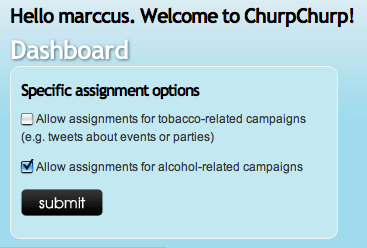
Here is for you to select if you wish to engage with Tobacco (cigarrete) or Alcohol related Ads. And I’m not interest with Tobacco one, so I only select the Alcohol related one. What if you didn’t select any? Actually it is fine also.
Customize disclaimer for tweets
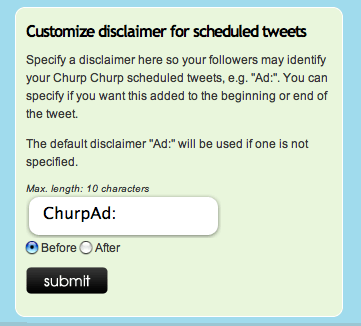
Here is to allow you to add special text in your tweet to identity the automated tweet is from Churp’s Ads. You can choose it to appear infront or behind the text. By default is “Ad:”, then here I changed it to “ChurpAd:”. So when people saw my twitter with “ChurpAd: xxxxx”, at least they know it is from Churp Churp.
Tweet rate

Here is to limit how many tweets you allow Churp to auto tweet for you. By the way, I just set it to No Limit, hahah.
Toggle on/off for Twitter and Facebook account

Here, you will first need to linked up your twitter and facebook account. You will need Churp to access into your twitter and facebook account, so just click yes when the pop up windows ask you to do so. When you wan to discontinued their service, can just disable and delete Churp apps from twitter and facebook Apps setting there.
And remember to turn On! =P
Scheduled Tweet

In Scheduled tweets, It shows you your assigned assignment awaiting to be done.
Seeding history

Here, you are able to view your assigned and pending approval assignments. For new assignment, read their description, then prepare your twitt as related to the topic as possible. Can just write funny one lar, hahah. Then remember to include the # hahstag or specific URL required.
Click on the “View scheduled tweet history” to view your approved tweet.
Scheduled history

here, you can see your tweeted tweet that let you earned some penny.
So, start to earn your pocket money now using twitter =D
You may feel free to follow my twitter here.. =D